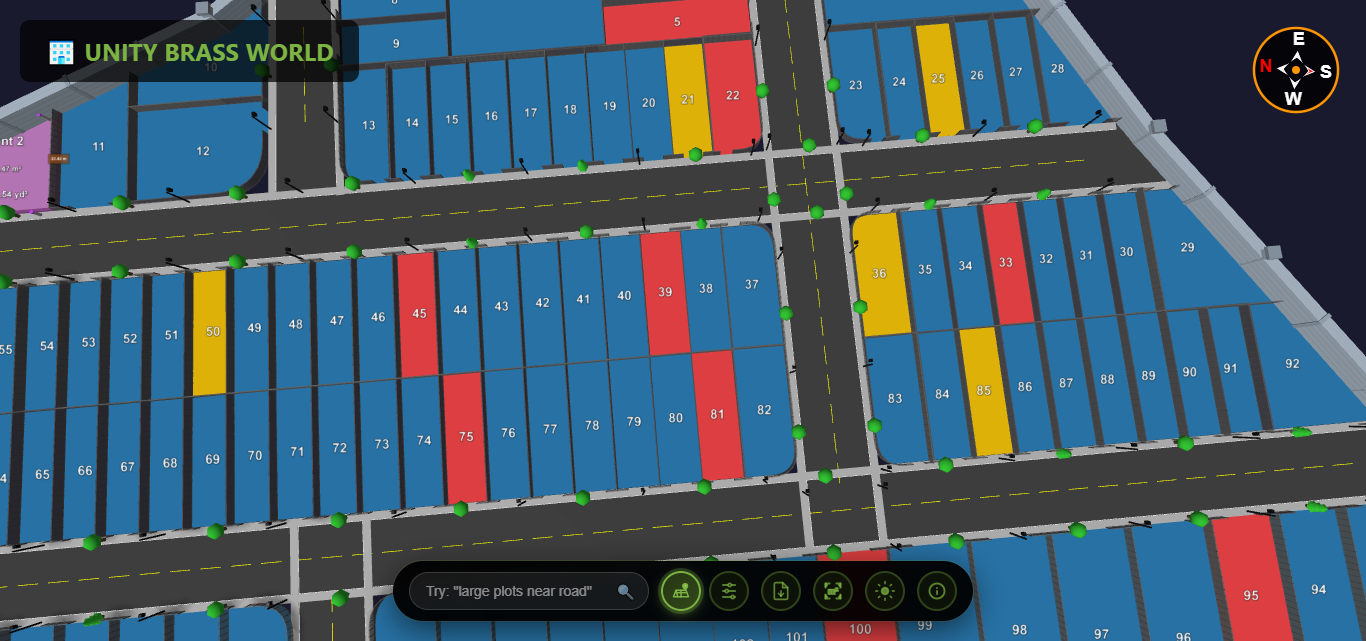

In modern real estate development, a topographic survey is no longer just lines on paper—it's the foundation for stunning 3D plot visualization that transforms how buyers understand and interact with land. This comprehensive guide explains how topographic survey data powers interactive 3D visualizations and why this matters for your real estate projects.
What is a Topographic Survey?
A topographic survey, also called a land topographic survey or topographic plot survey, is a detailed measurement and mapping of land elevations, contours, and features. Unlike simple boundary surveys, topographic surveys capture:
- Elevation data - Height measurements at multiple points across the property
- Contour lines - Lines connecting points of equal elevation
- Terrain features - Natural slopes, valleys, hills, and drainage patterns
- Existing structures - Buildings, roads, utilities, and improvements
- Vegetation - Trees, water bodies, and significant landscape elements
- Property boundaries - Legal property lines and adjacent features
Why Topographic Surveys Matter
For real estate developers, a professional topographic land survey is essential for site planning, drainage design, construction feasibility, and creating accurate 3D visualizations. It's the difference between guessing terrain challenges and knowing exactly what you're working with.
The Evolution: From Paper Maps to 3D Topographic Visualization
Traditional topographic surveys produced 2D maps with contour lines—difficult for non-experts to interpret. Today's digital topographic survey data transforms into interactive 3D topographic visualization that anyone can understand instantly.
How Plotex Transforms Topographic Survey Data into 3D
Plotex's topographic survey software converts raw survey data into stunning 3D plot visualizations through a sophisticated process:
Step 1: Import Survey Data
Import your topographic survey files in standard formats (DWG, DXF, CSV, KML). The system reads coordinate points, elevation data, contour lines, and boundary information directly from your surveyor's deliverables.
Step 2: Create 3D Terrain Model
The software processes elevation points to build a realistic 3D terrain model. High points become hills, low points become valleys, and slopes are rendered with accurate gradients based on your topographic land survey measurements.
Step 3: Add Plot Boundaries and Features
Plot boundaries from the survey are extruded vertically to create clear 3D plot divisions. Roads, existing structures, and utilities are modeled in three dimensions based on survey coordinates.
Step 4: Apply Visual Enhancements
The 3D topographic visualization adds realistic textures, lighting, and color coding. Elevation gradients can be highlighted, slopes visualized with color ramps, and different plot statuses clearly marked.
Step 5: Enable Interactive Exploration
The final 3D plot from survey data becomes fully interactive—users can rotate, zoom, measure, and explore the terrain from any angle in real-time.
Benefits of 3D Visualization for Topographic Survey Data
1. Instant Terrain Understanding
Instead of interpreting confusing contour lines on a topographic map, buyers see the actual 3D landscape. Slopes, elevation changes, and drainage patterns become immediately obvious in the 3D topographic visualization.
2. Better Plot Selection
When viewing topographic survey data in 3D, buyers can identify:
- Elevated plots with better views
- Level plots requiring less construction work
- Potential drainage or slope issues
- Natural features enhancing specific plots
- Optimal building orientations based on terrain
3. Construction Planning Visualization
The 3D plot from topographic survey helps visualize:
- Cut and fill requirements for leveling
- Retaining wall needs on sloped terrain
- Optimal driveway and access road placement
- Drainage system routing based on natural flow
- Foundation challenges in different plot areas
4. Premium Plot Identification
Using 3D topographic visualization, developers can justify premium pricing for plots with desirable topographic features—elevated positions, natural flat areas, or scenic terrain advantages become visually obvious.
5. Reduced Site Visit Requirements
High-quality 3D visualization of topographic survey data allows remote buyers to understand terrain without physical site visits. They can explore slopes, check drainage patterns, and evaluate plot suitability online.
Topographic Survey Methods for 3D Visualization
GPS-Based Topographic Surveys
Modern GPS topographic surveys use satellite positioning to capture accurate elevation data across large developments. This data flows seamlessly into 3D mapping software for visualization.
Accuracy: ±0.05 feet vertical, ideal for 3D topographic visualization
Best for: Large land parcels, open terrain, rapid data collection
Total Station Surveys
Total stations measure exact angles and distances to create detailed topographic plot surveys. The coordinate data produces highly accurate 3D terrain models.
Accuracy: ±0.01 feet, perfect for detailed 3D plot visualization
Best for: Complex terrain, urban areas, high-precision requirements
LiDAR Topographic Surveys
Aerial LiDAR creates digital topographic surveys with millions of elevation points. This dense data set produces exceptionally detailed 3D topographic visualizations showing every terrain nuance.
Accuracy: ±0.10 feet, excellent for large-scale 3D mapping
Best for: Large developments, challenging terrain, comprehensive coverage
Drone-Based Photogrammetry
Drones capture aerial images processed into topographic survey data and 3D terrain models. Cost-effective for mid-sized developments requiring 3D visualization.
Accuracy: ±0.15 feet, suitable for most 3D plot visualizations
Best for: Medium projects, quick turnaround, budget-conscious developers
Real-World Applications: Topographic Survey to 3D Success Stories
Case Study: Hill Station Development
A developer in Shimla had topographic survey data for a 50-acre hillside project with extreme elevation changes (200+ feet variation). Traditional 2D contour maps confused buyers who couldn't visualize plot slopes.
Solution: Plotex converted the topographic survey into interactive 3D visualization showing actual terrain relief, drainage patterns, and view corridors.
Results:
- 68% reduction in "terrain concern" objections
- Premium pricing achieved for high-elevation view plots (+22%)
- 80% of buyers selected plots remotely using 3D topographic visualization
- Zero post-purchase surprises about terrain challenges
Comparing Traditional vs. 3D Topographic Survey Presentation
| Aspect | Traditional 2D Survey Maps | 3D Topographic Visualization |
|---|---|---|
| Terrain Understanding | Requires expertise to interpret contours | Instant visual understanding |
| Slope Visualization | Contour line spacing (confusing) | Actual 3D slopes visible |
| Drainage Patterns | Must mentally calculate flow | Visual water flow paths |
| Buyer Accessibility | Professionals only | Anyone can understand |
| Remote Viewing | Static PDF/paper | Interactive online exploration |
| Construction Planning | Difficult to visualize challenges | Clear cut/fill requirements |
| Sales Effectiveness | Often requires site visits | Sell remotely with confidence |
Key Features to Look for in Topographic Survey 3D Software
When selecting topographic survey software for 3D plot visualization, prioritize these capabilities:
1. Multiple Survey Format Support
Import DWG, DXF, CSV, KML, LandXML, and other standard topographic survey formats without conversion hassles.
2. Accurate Elevation Rendering
Maintain survey-grade precision in the 3D topographic visualization—elevation accuracy should match the original topographic land survey data (within 0.01-0.1 feet).
3. Interactive Terrain Exploration
Enable 360-degree rotation, zoom, pan, and fly-through modes for comprehensive 3D terrain model exploration.
4. Measurement Tools
Built-in tools to measure distances, elevations, slopes, and areas directly on the 3D topographic visualization.
5. Visual Customization
Adjust elevation color ramps, contour intervals, slope highlighting, and aspect analysis for better topographic survey communication.
6. Plot Overlay Capabilities
Layer plot boundaries, roads, and utilities over the 3D terrain model from your topographic plot survey.
7. Multi-Device Accessibility
View 3D topographic visualization on desktop, tablet, and mobile without plugins or apps.
8. Sharing and Collaboration
Generate shareable links for the 3D plot from survey data—no technical knowledge required for viewers.
How to Get Started: Topographic Survey to 3D Workflow
Step 1: Commission a Professional Topographic Survey
Hire a licensed surveyor to conduct a comprehensive topographic land survey. Specify that you'll need data for 3D visualization—this ensures appropriate point density and data formats.
Step 2: Receive Survey Deliverables
Your surveyor provides:
- CAD files (DWG/DXF) with contours and features
- Coordinate/elevation data (CSV/Excel)
- Survey report and legal descriptions
- Photos and field notes
Step 3: Upload to Plotex 3D Platform
Import your topographic survey files into Plotex. The system automatically processes elevation data and creates the base 3D terrain model.
Step 4: Add Plot Boundaries and Features
Overlay your development plot layout, roads, and utilities onto the 3D topographic visualization.
Step 5: Customize Visualization
Adjust colors, labels, elevation highlighting, and viewing angles to create the most effective 3D plot presentation.
Step 6: Share with Stakeholders
Generate shareable links to your 3D topographic visualization for buyers, investors, planners, and construction teams.
Common Questions About Topographic Survey 3D Visualization
How much detail does a topographic survey need for 3D visualization?
For effective 3D topographic visualization, aim for elevation points every 10-25 feet on relatively flat terrain, 5-10 feet on moderate slopes, and 2-5 feet on steep or complex terrain. Denser data creates smoother, more realistic 3D terrain models.
Can I create 3D visualization from old topographic surveys?
Yes! Existing topographic survey data—even from years ago—can be converted to 3D visualization. However, verify the survey is still accurate if significant site changes occurred (grading, construction, erosion).
What's the cost difference between 2D and 3D survey visualization?
The topographic survey itself costs the same whether you use it for 2D or 3D. Converting to 3D visualization with Plotex is a one-time setup—far less expensive than the increased sales and reduced site visit costs it enables.
Do buyers really care about topographic details?
Absolutely. Terrain affects drainage, construction costs, views, privacy, and usability. 3D topographic visualization helps buyers understand these factors instantly—leading to more confident purchases and fewer post-sale issues.